Mastering pacing on the digital SAT is key to finishing on time and boosting scores, with roughly 71 seconds per Reading and Writing question and 95 seconds per Math question.
- RW timing — 2 modules of 27 questions each, 32 minutes per module, about 71 seconds per question.
- Math timing — 2 modules of 22 questions each, 35 minutes per module, about 95 seconds per question.
- RW strategy — Read the question before the passage, answer grammar and vocabulary questions first for quick points, save reading comprehension and graph-based questions for last, and flag anything unresolved after 60 seconds.
- Math strategy — Use a three-pass system (instant recognition, medium scratch-work questions, then hardest last), flag anything unclear after 30 seconds, lean on the built-in Desmos calculator, and use extra time at the end to double-check signs, units, and simple errors.
- Never leave a blank — There's no penalty for wrong answers, so every question should get a response before time runs out.
Digital SAT pacing is the single skill that separates students who finish strong from those who run out of time.
Good news is: it’s learnable.
In 2025, a 17-year-old Sahli Negassi from New Jersey scored a perfect 1600. And we’re pretty sure that a good pacing strategy played a major role in maintaining his accuracy across the test.
The Digital SAT gives you just 134 minutes to answer 98 questions. That averages out to roughly 82 seconds per question. But in reality, some questions demand far more time and attention than others.
Good SAT pacing comes down to making smart decisions while the clock is running. They come from knowing:
- When to move quickly
- When to slow down
- When to stop one difficult question from stealing time elsewhere
As the Digital SAT becomes more competitive, content knowledge alone isn’t enough to manage time well. One needs to master the clock to translate that knowledge into performance. Good for you, as you’ve landed on the right guide for SAT tips and tricks to pace well.
In this article, we include the SAT timing breakdown, adaptive difficulty, Bluebook time-per-question analytics, and practical strategies for managing the clock without losing accuracy.
Digital SAT Time Breakdown: How Many Seconds You Have Per Module
The Digital SAT gives you 134 minutes to complete 98 questions across two adaptive sections: Reading & Writing and Math. However, pacing the test becomes much easier when you stop thinking in total minutes and start thinking in seconds per question.
Here’s the digital SAT section timings and adaptive modules breakdown:
You cannot carry over unused time from one module to the next. If you finish a module early, the remaining time disappears once the next module begins.
Let’s talk about it a bit more in detail.
One Rule You Must Know: You Cannot Bank Time Between Modules
“If I finish Module 1 early, I’ll have extra time later.”
Many students walk into the Digital SAT believing this. But the SAT doesn’t work that way, and this misunderstanding hurts many test-takers.
Students rush through Module 1, thinking they are “saving time,” only to make careless mistakes in the first module.
In reality, each test module is timed separately. Once that timer ends, the module automatically locks, and the test continues. Any unused time disappears.
What does that mean for your Digital SAT time management?
- You cannot carry extra minutes from the Reading & Writing Module 1 into Module 2
- You cannot transfer unused Math time between modules
- You cannot return to a previous module after it closes
So, the goal is not to beat the clock early, but to use your time intentionally inside each module. Because in adaptive SAT, module 1 matters a lot. A strong Module 1 performance can move you into a more challenging second module with higher-scoring potential. However, a weaker Module 1 can limit your scoring ceiling.
That means SAT pacing is not about finishing as fast as possible. It is about balancing speed, accuracy, and decision-making under pressure.
What Is the Importance of Time Management on the SAT?
Most student-mentor conversations about the SAT tend to revolve around familiar questions:
- What was your study strategy?
- How did you get such a high score?
- How did you approach tricky questions?
What rarely comes up is how to pace each section of the digital SAT. And yet, time management is one of the most decisive factors on test day.
Knowing the content helps, but it’s not enough. If you don’t manage your time well, even the right knowledge won’t show up in your score.
Effective pacing helps because it:
- Lowers test anxiety by giving students a clear plan instead of forcing them to react to the clock
- Builds confidence as the pacing strategy works section by section
- Reduces rushed errors on easy questions and overthinking on difficult ones
Good time management also helps students:
- Preserve mental energy for tougher questions
- Maintain focus across the entire section
- Avoid panic-driven guesses in the final minutes of the test
With that foundation in place, let’s dive into how pacing strategies work on the digital SAT scoring and how they can be applied deliberately, not instinctively.
Broader Tips for Better SAT Time Management
1. Not all questions need the same time
The digital SAT has 134 minutes for 98 questions, which means students have about 82 seconds per question. But this average isn’t the true picture.
Because of the sectional time limits, this average is 71 seconds in the Reading and Writing section and 95 seconds in the Math section.
Also, some questions are trickier than others - complex logic, difficult phrasing, or extended calculations. Hence, don’t paint the SAT with a single broad brush; adjust your time based on the difficulty level of each question.
2. Follow the skip-and-return strategy
Michael Stroup, a SAT tutor who himself scored a perfect 1600, is a great believer in skipping instead of wasting time. “The worst thing you can do is run out of time on question 18 when you could have done Q19, Q20, and Q21, but you didn't even allow yourself to see those questions!” he says in a YouTube video.
"So here’s one of the most important pacing strategies for the SAT: Students need not spend more than 45 seconds on a question with no progress. They should flag it and move on. There might be better questions coming up, so just skip this. They can return to this question if there’s time."
As they say, the SAT is not the time to show the world you can stick to something, no matter how long it takes.
3. Check the time regularly
Students have to monitor time throughout the test. Say, build a habit: check the timer every 5 questions (e.g., after Q5, Q10, Q15, and so on). This gives you frequent but non-disruptive checkpoints.
4. Practice with timed tests
Timed practice builds an internal sense of pacing, a kind of instinct. Over time, students will get an alert if they spend too long on a question, even without checking the clock.
These instincts improve as students get to know their strengths and weaknesses. By the halfway point of a question, students often know if it’s worth continuing.
To continuously practice, check out our high-quality, timed SAT practice tests.


Section-by-section SAT pacing tips
Now that you understand overall time management for the SAT, it’s time to discuss section-specific strategies for pacing the SAT.
1. Reading & Writing Pacing
The digital SAT structure features shorter passages, with just one question per passage. This is a shift from the older SAT format, where longer passages were followed by multiple questions. That change means new pacing strategies are needed.
Reading questions
Each module has 27 questions and 32 minutes. Roughly half (about 14-15) are Reading-based. Since these questions involve understanding in detail, aim to spend 85-90 seconds per Reading question. That’d total to around 22 minutes.
If you’ve read both the passage and question twice and still feel uncertain, flag it and move on. Lingering too long costs you valuable time elsewhere. Always remember: the decision to guess and flag shouldn’t take over 40 seconds.
Writing questions
The writing questions don’t include a passage - just a sentence or two to analyze. So you can attempt them faster.
If you have followed the strategy for the Reading questions, you’ll have about 11 minutes left for the remaining 12-13 Writing questions. That gives you around 45 seconds per question.
Be consistent: eliminate choices with grammar issues such as subject-verb disagreement, faulty parallelism, or incorrect comparisons. Speed comes from pattern recognition.
Reading Questions vs. Grammar Questions: Where Your Time Goes
Not all Reading & Writing questions will need the same level of effort.
Reading-based questions usually take longer because they require:
- Understanding a passage
- Identifying tone or purpose
- Making inferences
- Analyzing evidence or transitions
So, you can allot questions of SAT reading time around 85 to 90 seconds each.
Grammar and Standard English Convention questions move much faster. Most include only a sentence or two. This means you can often solve them in 30 to 45 seconds once you recognize the rule being tested.
A strong pace balances both types, rather than treating all 27 questions equally, and you need to incorporate a solid set of SAT Reading & Writing strategies to achieve that.
2. The Math section
You’ll have full calculator access, so calculation speed won’t be your biggest hurdle - knowing what to calculate will be.
Each Math module includes 22 questions and allows 35 minutes, giving you about 95 seconds per question. But that’s just a starting point.
Your time per question should vary based on your strengths. You may, for instance, breeze through algebra but need more time for geometry. While improving your ability on how to pace the SAT, knowing your strong and weak areas is a must.
Allocate extra time for word problems, which demand careful reading before you even start solving. Watch out for:
Key terms like “each” or “per”: Missing them can confuse you because you may end with the wrong answer or repeat many calculations.
Numbers in words (e.g., “two notebooks”): These are easy to overlook compared to numerals like 49 or 24.
Example:
At Bunford High, each of the 49 students used an average of two notebooks. Each notebook has 24 pages. How many total pages …
If you miss the word “two,” your answer will be way off. It will frustrate you, and you’ll waste time recalculating.
Final tip: Memorize formatting rules for Student-Produced Response questions. For instance, entering “2 1/3” might be read as 21/3. Instead, write it as “2.333” or “7/3,” depending on the question’s instruction. Don’t waste time looking this up mid-test.
Module 1 vs. Module 2: How Adaptive Difficulty Changes Your Pacing
We mentioned earlier that the Digital SAT Math section is adaptive, which means your performance in Module 1 affects the difficulty of Module 2. But many students panic when Module 2 suddenly feels much harder. Since getting answers becomes difficult, they assume they are doing badly.
However, reality is different because how adaptive difficulty affects scoring is a bit complex.
A harder second module usually means you performed well enough in Module 1. Think of it as a game — you’ve unlocked a new level of greater difficulty with greater scoring potential. Now, the number of correct answers in a harder section carries more weight than the number of correct answers in an easier one.
But a new difficulty level means your SAT pacing strategy should change.
In Module 1, your goal should be to balance accuracy and steady pacing. But in a difficult Module 2, the goal shouldn’t be to “finish everything perfectly.” Because wasting four minutes on one impossible question can cost you multiple easier points later in the module.
The smarter approach here will be:
- Secure the questions you can solve confidently
- Avoid getting trapped on one difficult problem
- Protect your accuracy across the module
So, if a question feels unusually long or calculation-heavy, flag it and continue. High SAT math scores come from smart time decisions rather than perfect completion.

What to Do When You're Running Out of Time Mid-Module
You glance at the clock and realize you have 4 minutes left with 6 questions still unanswered. At this point, most students panic and start rushing. But that usually makes the situation worse by abandoning their pacing strategy entirely and making hasty, random decisions.
When time starts running out on the Digital SAT, your goal changes. Now, instead of trying to solve every question perfectly, it's about protecting as many points as possible.
Test pacing on the digital SAT is, for the most part, staying composed when the clock is part of the challenge.
Start with the process of elimination (POE). Even removing one obviously wrong answer improves your odds of guessing correctly, so if you can narrow four choices down to two, your chances immediately jump from 25% to 50%.
But don’t let elimination turn into overthinking.
If a question still feels unclear after a reasonable attempt, you know what to do — flag it, choose your best remaining option, and move on.
A very important thing to remember: The SAT does not penalize wrong answers. Leaving questions blank only guarantees lost points. So, if you reach the final minute with several unanswered questions, use the LOTD strategy.
In this strategy, you pick one answer choice, either A, B, C, or D. Then you use it consistently for all remaining guesses. This prevents last-second hesitation and helps you move through unanswered questions quickly under pressure.
Tools to improve SAT pacing
To manage your time effectively on the SAT, practice is essential - but not just any practice. Use these tools strategically:
1. Sectional timed practice tests
These help you pinpoint how long you take on different question types. You might realize, for instance, that math questions with charts or diagrams take you longer than expected.
Use them to:
- Identify peril-points: where you tend to slow down or rush
- Spot areas that need more practice
- Apply shortcuts and pacing strategies you've learned
2. Full-length mock tests
Taking a 32-minute section is one thing; getting through the full 134-minute test is another. Full mock tests help you build stamina and train you to be your best all throughout the test.
They help you:
- Stay focused across all four modules
- Manage fatigue for over two hours
- Practice executing strategies unique to each section, in one sitting
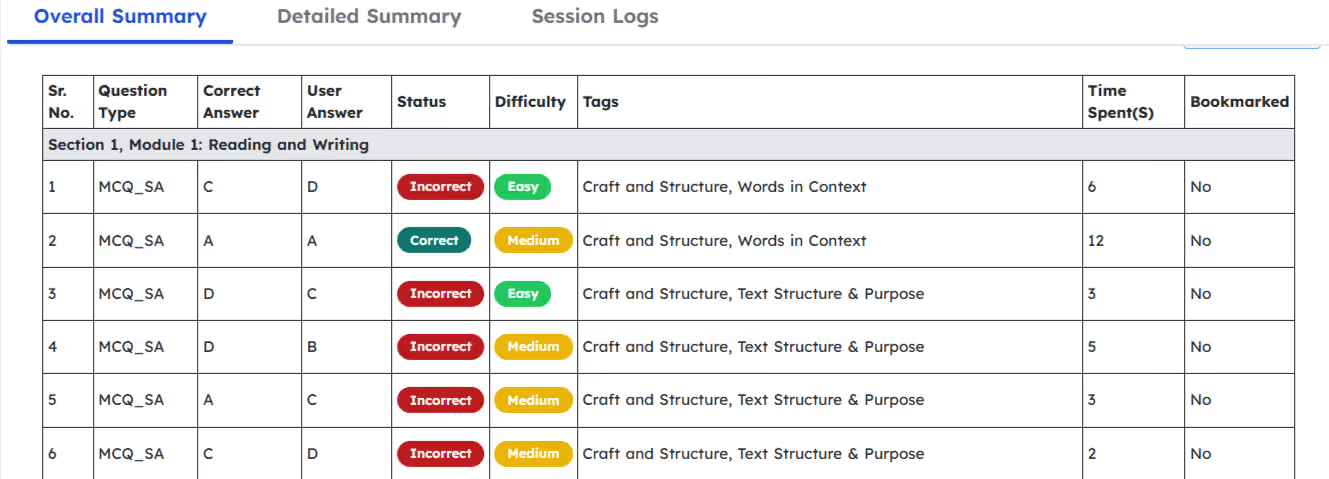
3. How to Use Bluebook's "Time Spent Per Question" Data
Official Bluebook practice tests are some of the most realistic SAT prep resources available. But simply taking the tests is not enough. The real improvement begins after the test is over.
Many students wonder:
“Does Bluebook SAT show time spent per question?”
The simple answer is yes. Bluebook SAT time spent per question is one of the most valuable data points. After completing a practice test, Bluebook allows you to review:
- How much time per question on SAT you spent
- Where you slowed down
- Which questions caused hesitation
- How your pacing changed throughout the module
Pacing problems are rarely spread evenly across the test. For example, your results may reveal that inference-based reading questions consistently took over 2 minutes, or geometry questions slow you down more than algebra. You may have also spent too much time reconsidering flagged answers, or your pacing collapsed in the final 10 minutes of a module.
All these patterns are difficult to notice while taking the test, but the timing analytics make them visible.
The goal is not to obsess over every slow question. Instead, use the data to identify repeat pacing problems and adjust your next practice session accordingly.
So, if Reading questions are draining your time, practice shorter timed drills focused only on passage comprehension. Or if Math pacing drops late in Module 2, train yourself to move on faster from calculation-heavy problems.
You can use Bluebook Analytics to go a step further by tracking time spent per question across multiple tests, question types, and difficulty levels. Instead of reviewing pacing test by test, you can identify long-term timing trends and see whether your pacing is actually improving over time.
4. EdisonOS mock tests
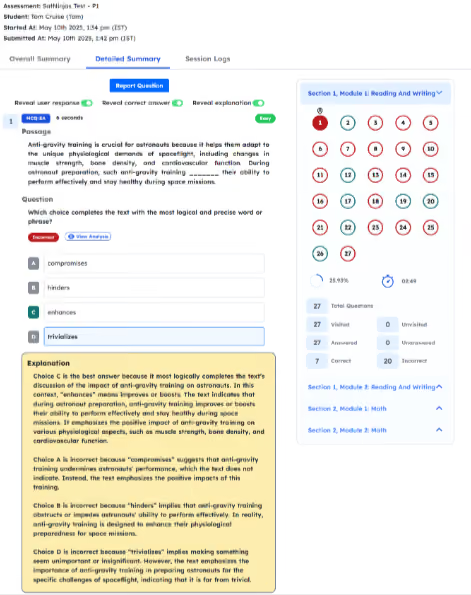
While many SAT practice tests exist, few match the real SAT experience and offer deep performance analysis.
EdisonOS mock tests provide:
- Realistic, adaptive-style SAT simulations
- Clear breakdowns of your strengths and errors
- Detailed answer explanations and distractor analysis
Pacing Traps to Avoid
Even a well-prepared test-taker can fall into pacing traps. Here are five frequent pacing mistakes and how to avoid them:
1. Spending too much time on hard questions
Tough problems can drain your time if you’re not careful. Don’t let the never-ending illusion of “I can do it in another minute!” ruin your overall score.
Fix it:
- Skip tough questions and return later
- Tackle easier ones first
- Set time limits per question and move on when needed
2. Not marking questions to revisit
Forgetting to flag uncertain answers means missed review chances.
Fix it:
- Use the “mark” feature and jot a quick note
- Practice with tools that offer marking functions
- Recheck marked questions before time runs o
3. Misreading due to rushing
Speeding leads to skipped keywords and careless errors.
Fix it:
- Slow down on critical phrases
- Read fully; highlight tricky wording if needed
- Use practice test data to spot phrases that mislead you
4. Failing to keep track of time
Without time awareness, you risk leaving questions unanswered.
Fix it:
- Set checkpoints (e.g., time after every 5 questions)
- Glance at the timer when stuck
- Be strict - move on if a question exceeds your time limit
5. Not practicing with a timer during prep
Untimed study builds weak pacing habits.
Fix it:
- Use a timer; break the section into 10-minute blocks
- Simulate real test conditions
- Take full-length timed mocks regularly
Conclusion
SAT pacing can make or break your scores. Even top performers may fall short if they mismanage time or lose focus.
In order to make sure that you do your best, master the test format, practice under timed conditions, and steer clear of common pacing traps.
Whether you're slow on reading, stuck on tough math, or thrown off by the ticking clock, targeted practice and self-awareness can help you take control. With consistency, pacing can shift from a weakness to a strength.
Pacing isn’t just instinct - it’s a skill you can build, so keep working on it and you’ll get it.
Frequently Asked Questions
.svg)


.png)

.png)