- A realistic Digital SAT simulation should replicate the exam's adaptive modules, official timing, Bluebook interface, and testing conditions.
- Students should take full-length practice tests in one sitting, using a laptop or tablet and following the official break schedule.
- Common simulation mistakes, such as pausing timers, practicing untimed sections, and skipping error analysis, can lead to misleading practice scores.
- Effective SAT tutors use simulations to track timing patterns, analyze performance data, and create personalized improvement plans.
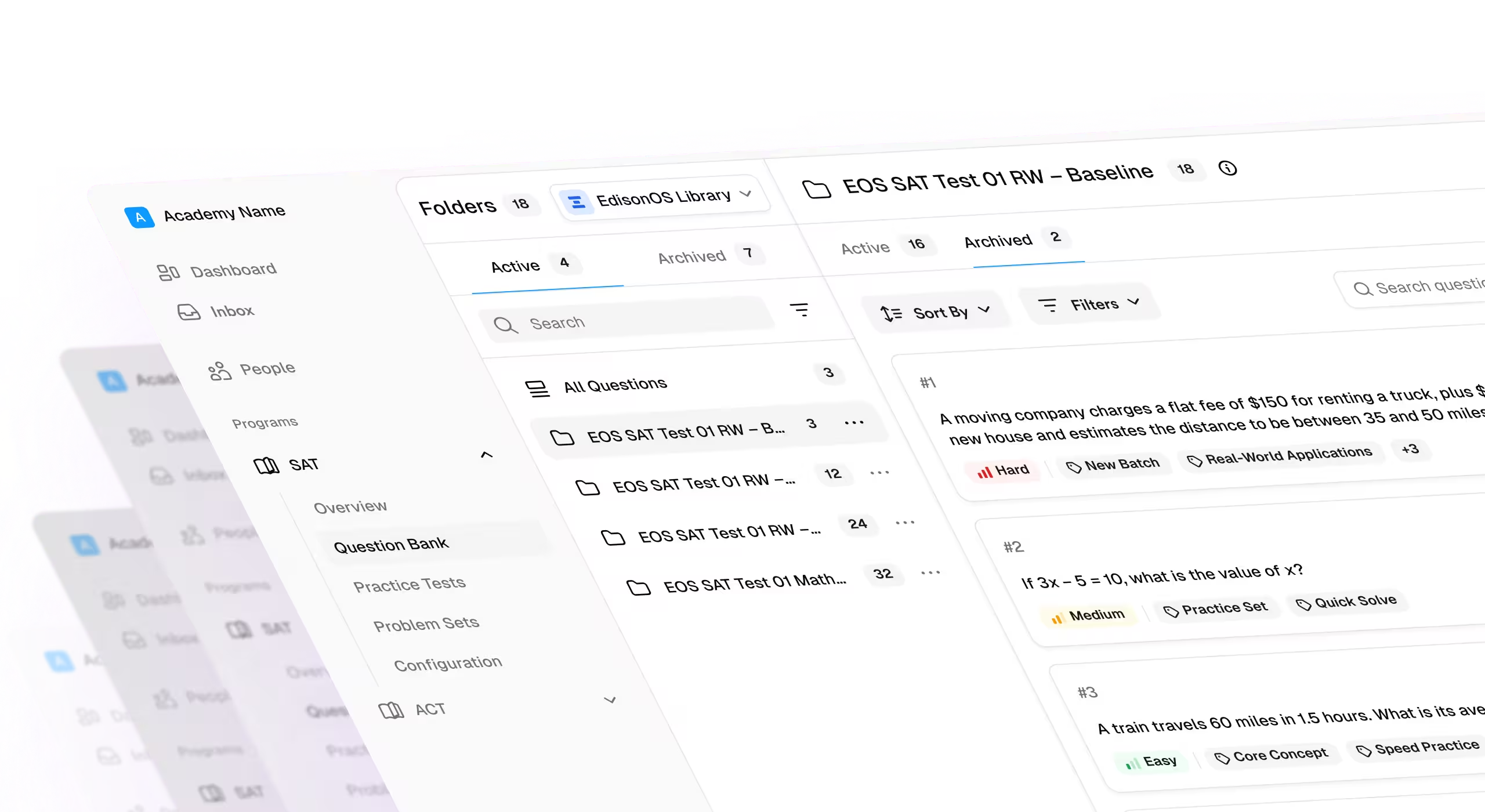
- Platforms like EdisonOS help students and tutors run authentic Digital SAT simulations with adaptive mock tests, detailed analytics, and automated reporting.
You wouldn't train for a marathon by jogging around the block. The same applies to the Digital SAT.
Solving practice questions helps, but it doesn't prepare students for adaptive modules, strict timing, or the pressure of a full-length exam. To improve scores consistently, students need practice that feels like test day.
In this guide, we'll explain how to simulate real Digital SAT testing conditions, the tools that make simulations effective, and how tutors can use mock exams to drive measurable score improvements.
How the Digital SAT Format Affects Simulation Setup
A realistic SAT simulation today looks very different from one built for the paper SAT.
Before the Digital SAT, every student saw the same questions, worked through long reading passages, and completed a separate no-calculator math section. They spent nearly three hours testing.
But the new Digital SAT format is shorter, adaptive, and built around the Bluebook testing app. That means practice tests must now prepare students for the new testing experience and not just the content.
Here’s what's changed and how it affects the simulation setup:
Adaptive modules replace fixed sections
The paper SAT followed a linear format. Whereas, the Digital SAT uses two modules for both Reading & Writing and Math. The second module adjusts difficulty based on performance in the first.
Students need adaptive testing practice to experience the same pacing, pressure, and score progression they'll face on test day.
The test is shorter but faster
Testing time has dropped from roughly three hours to 2 hours and 14 minutes. Questions are fewer, but decisions happen quickly.
Simulations should follow official timing rather than extended study-session conditions.
Reading is now built around short passages
Instead of long passages followed by several questions, students work through brief passages that typically support a single question. Practice should reflect this faster reading rhythm.
Calculators are available throughout Math
The old SAT included a no-calculator section. However, the Digital SAT allows calculator use across both math modules. It has the built-in Desmos calculator in the Bluebook.
Students should practice with the same tools they'll use during the exam.
The interface matters more than ever.
Features like timers, question flagging, highlighting, answer elimination, and the built-in calculator are now part of the testing experience. The closer a simulation matches Bluebook, the more comfortable students feel on exam day.
How to Simulate Real Digital SAT Testing Conditions
Don’t treat your SAT simulation as just another practice session. Think of it as a dress rehearsal where creating a realistic performance environment becomes crucial.
The closer your setup is to test day, the more reliable your score and performance data become. The goal is to duplicate the test day as much as possible.
You should be taking the following steps to simulate real digital SAT testing conditions.
1. Use a full-length adaptive practice test
The first step to mimicking the conditions of test day is to start with a complete Digital SAT practice test. This practice test must be adaptive, meaning your performance in the first module should determine the difficulty of the second.
Practicing with adaptive mock tests helps you experience the same pacing, pressure, and score progression you'll face on test day.
2. Follow official timing exactly
Resist the temptation to add extra minutes just because it’s a practice test.
Use the official timing:
If you want a realistic score, you need to work with realistic timing conditions.
3. Finish the test in a single sitting
You can’t split a real test over days, so you shouldn’t split a practice test either.
The Digital SAT may be shorter than the paper version, but it still demands over two hours of sustained concentration. By completing the exam in one sitting, you’re working on building the mental stamina needed for test day.
4. Remove everyday distractions
A realistic simulation should feel similar to a testing center. Even small interruptions can distort pacing and concentration, which will make your practice test scores less reliable.
Silence notifications, close unused tabs, and put your phone away.
5. Use the same calculator you'll use on test day
The Digital SAT allows the use of calculators throughout the Math section. So, if you plan to bring an approved handheld calculator, practice with that exact model.
Note: Students using Bluebook's built-in Desmos calculator should become equally comfortable navigating its features before exam day.
6. Practice on a laptop or tablet
You won’t be taking the real SAT on the phone. So, don’t take SAT simulations on a phone.
The official exam is designed for laptops and tablets. By using the same type of device during practice, you will become familiar with the interface — screen navigation, question review tools, and the overall testing experience.
7. Take the official break
Many students skip breaks during practice. But we strongly suggest against it.
Use the same 10-minute break provided on the actual SAT. Stand up, stretch, grab water, and reset your focus before beginning the Math section.
8. Train for real testing conditions
The SAT doesn't allow headphones, earbuds, or music. So, you should also practice in a quiet environment without relying on audio aids.
Building concentration under normal testing conditions prevents surprises on exam day and improves focus when it matters most. A good SAT simulation doesn't just mean working similar questions. You need to replicate the environment, timing, tools, and decision-making conditions you will encounter during the real exam.
Best Tools for Digital SAT Simulation
The best SAT simulation setup usually combines multiple tools. Students need realistic mock exams, targeted practice, and performance analysis, while tutors need additional tools to assign tests, track progress, and personalize instruction.
Here's where each platform fits.
The Bluebook app: Best for official test-day practice
If students can only use one simulation tool, start here.
Bluebook is the official testing application used for the Digital SAT. It delivers adaptive practice tests with the same interface, timer, calculator, question flagging, and navigation tools as the real exam.
The Digital SAT itself is administered through Bluebook, making it the closest possible simulation experience.
Best for: Familiarizing students with the official testing environment.
Adaptive SAT practice platforms: Best for skill development between mock tests
Full-length simulations identify weaknesses, and adaptive practice helps fix them. Platforms such as Khan Academy adjust question recommendations based on student performance. This creates personalized study paths and helps students strengthen weak skills between practice exams.
Best for: Daily practice and targeted skill improvement.
Online SAT mock test systems: Best for building test-day readiness
Mock test platforms like Princeton Review or Magoosh help students rehearse under realistic conditions.
Look for tools that replicate:
- Adaptive modules
- Official timing
- Digital calculators
- Question review options
- Section navigation
The closer the experience is to Bluebook, the more valuable the simulation becomes.
Best for: Improving pacing, stamina, and confidence.
Student analytics dashboards: Best for identifying score gaps
A score alone doesn't explain why performance changed. You’ll want strong analytics dashboards to monitor student progress via insights like:
- Timing patterns
- Skill-level accuracy
- Question difficulty trends
- Long-term improvement.
These insights help students focus their study time where it produces the greatest score gains.
Best for: Turning practice results into actionable study plans.
SAT simulation software for tutors: Best for running complete SAT programs
Most tools are built for individual students. EdisonOS is designed for tutors, coaching centers, and SAT programs that need to manage dozens or hundreds of students simultaneously.
With EdisonOS, tutors can:
- Assign full-length adaptive SAT tests
- Create custom assessments
- Replicate the Bluebook testing interface
- Track student performance
- Generate detailed analytics
Plus, the platform also supports progress tracking, skill analysis, timing reports, and personalized practice workflows.
So, instead of juggling separate testing, reporting, and assignment tools, tutors can manage the entire SAT simulation process within a single system.
Best for: SAT tutoring businesses, coaching centers, and educators running structured preparation programs.
Quick Recommendation
- Want the most authentic exam experience? Use Bluebook.
- Need targeted skill practice? Use Khan Academy.
- Want realistic mock exams? Use Digital SAT simulation platforms like Princeton Review.
- Need detailed performance insights? Use analytics dashboards from platforms like UWorld.
- Running an SAT tutoring program? Use EdisonOS to combine testing, analytics, assignments, and student management in one platform.
Common Mistakes Students Make During SAT Simulations
A practice test is only valuable if it mirrors the real exam. Many students put in the hours, but unknowingly create testing conditions that never exist on SAT day. As a result, they get inflated practice scores and unpleasant surprises during the actual exam.
Here are some common mistakes students (and even tutors) often make with SAT simulations:
Mistake 1: Pausing timers frequently
Why It Hurts: Stopping the clock may feel harmless, but it removes the pressure that makes the SAT challenging. Students lose the opportunity to develop pacing instincts and time-management skills.
Do this instead: Start the timer once and let it run until the section ends.
Mistake 2: Practicing untimed sections
Why It Hurts: Untimed practice can help with concept learning, but it cannot measure SAT readiness. Without time pressure, students often solve questions more carefully than they would during the exam. This creates a false sense of confidence and makes score predictions less reliable.
Do this instead: Follow official section timing for every simulation.
Mistake 3: Taking simulations on phones
Why It Hurts: The Digital SAT isn't designed for mobile screens. Reading passages, math problems, graphs, and navigation tools feel very different on a phone. If students use a phone for simulations, they may develop habits that don't translate well to the test day.
Do this instead: Practice on the same type of laptop or tablet you'll use during the actual exam.
Mistake 4: Ignoring error analysis
Why It Hurts: Many students focus only on their score, but the score is the outcome and not the lesson. The most valuable insights come from error analysis done by reviewing missed questions, timing patterns, and recurring skill gaps. That's where future score gains are found.
Do this instead: Spend at least as much time reviewing a test as taking it.
Mistake 5: Skipping full-length mock exams
Why It Hurts: Students who only practice individual sections never experience the concentration demands of a complete Digital SAT. Fatigue often appears in later modules, exactly when points matter most.
Do this instead: Schedule regular full-length mock tests throughout your preparation.
How Tutors Can Run Effective SAT Simulation Tests
A mock test should do more than produce a score. The best tutors use simulations to uncover patterns, diagnose weaknesses, and guide future instruction.
Every test becomes a decision-making tool.
When tutors combine the following five steps, simulations become more than practice tests and serve as a structured system for improving scores week after week.
The SAT Simulation Playbook for Tutors
- Run mock exams consistently: Schedule full-length SAT simulations every week or every other week. Consistent testing builds familiarity with the adaptive format and makes progress easier to measure.
- Monitor timing, not just accuracy: Watch how students use their time. Finishing too quickly, rushing the final questions, or spending too long on difficult problems can reveal hidden score barriers.
- Turn reports into insights: Review performance by section, skill, and question difficulty. Look for recurring patterns rather than isolated mistakes. The goal is to identify what should improve next.
- Match practice difficulty to performance: As students improve, gradually increase the difficulty of questions. Adaptive practice keeps students challenged without overwhelming them and better reflects the Digital SAT experience.
- Create personalized improvement plans: Every simulation should lead to a clear action plan. Focus on the two or three areas that will have the greatest impact on the student's score rather than assigning generic practice.
How EdisonOS Supports Digital SAT Simulation
Running realistic SAT simulations sounds simple, but in practice, tutors often juggle multiple tools — for testing, scoring, reporting, assignments, and student tracking. It creates extra work and inconsistent learning experiences.
EdisonOS brings all those pieces together in a single platform and supports SAT simulation from start to finish. Here’s how:
- Students take full-length adaptive mock tests: EdisonOS includes full-length Digital SAT practice tests designed to replicate the official Bluebook experience. Students practice with the same adaptive module structure, timing rules, and test-day tools they will encounter on the actual exam.
- Practice adapts as students improve: Tutors can assign targeted practice based on student performance rather than relying on generic worksheets. This creates a more personalized learning path while helping students prepare for the adaptive nature of the Digital SAT.
- Every test generates actionable insights: After a simulation, tutors can review skill-level performance, timing patterns, question analytics, accuracy trends, and other detailed performance data. These insights make it easier to identify weaknesses and prioritize future instruction.
- Scoring and reporting happen automatically: Students receive results immediately after completing a test. Tutors no longer need to spend hours grading exams or manually compiling performance reports. Automated scoring accelerates feedback and keeps students engaged in the learning process.
- Tutors can manage the entire simulation workflow: From diagnostic assessments and weekly mock exams to progress tracking and parent reporting, everything lives in one place. Tutors can create structured SAT preparation programs without switching between multiple platforms.
The result: A simulation environment that feels much closer to the actual Digital SAT while giving tutors the data and tools needed to guide meaningful score improvement. Book a demo to see how full-length SAT mock tests, adaptive practice, automated reports, and tutor-focused workflows can support your SAT preparation program.
Final Thoughts
The Digital SAT is more than a digital version of the old exam. Its adaptive structure, shorter format, built-in tools, and Bluebook interface create a testing experience that students need to practice intentionally. While solving SAT questions is important, learning how to perform under realistic test conditions is equally critical.
For students: When practice closely mirrors the actual exam, they gain familiarity with the format, build endurance, and identify weaknesses before test day.
For tutors: Simulations provide valuable insights that help personalize instruction and track progress over time.
Therefore, the closer the simulation is to the real Digital SAT experience, the more meaningful the results and the better prepared students will be on test day.
Frequently Asked Questions
.svg)




.avif)